ED25519 · ECDSA · SECURE ENCLAVE
Generate an SSH key
on your iPhone.
Create a key in the Secure Enclave on supported devices or use Ed25519 in the Keychain. Import existing Ed25519 and ECDSA keys. Add the public part to your server and select the key for your host.
Notify meGenerate and set up your key
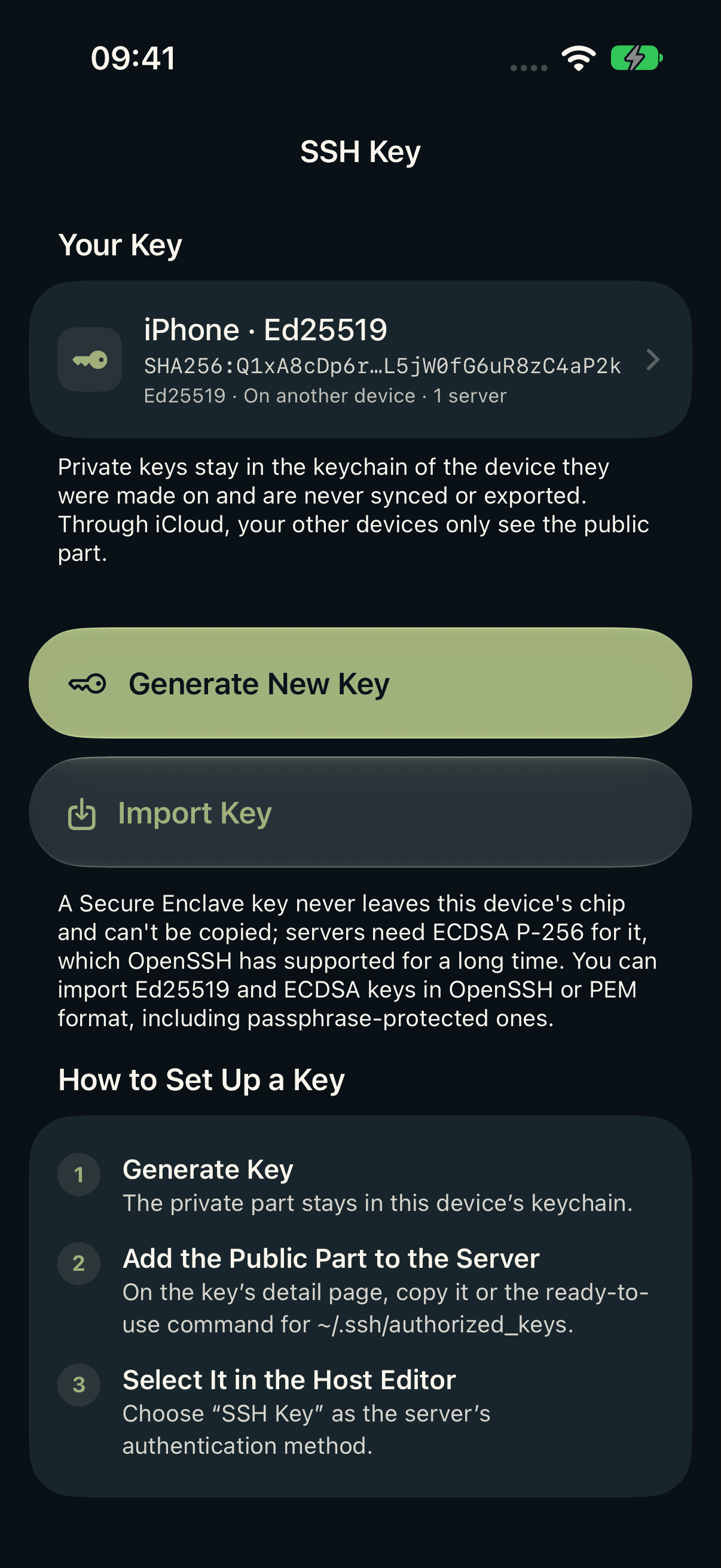
Create or import a key
Open Settings → SSH Keys. Supported devices offer Secure Enclave with ECDSA P-256 and Ed25519 in the Keychain. Import Ed25519 and ECDSA, including passphrase-protected OpenSSH keys.
Add it to your server
Copy the command on the detail page and run it once on the server. It adds the public key to ~/.ssh/authorized_keys.
Choose it for your host
In the host editor, choose SSH Key and a key whose private part is available on this device.
What happens on the server
The public key is one line in ~/.ssh/authorized_keys for the signed-in user. Ed25519 begins with ssh-ed25519; ECDSA begins with ecdsa-sha2-nistp256, ecdsa-sha2-nistp384 or ecdsa-sha2-nistp521.
Run the command on the server, for example in a session you signed in to with your password. If key sign-in doesn’t work afterwards, check the permissions on the server: the ~/.ssh directory should belong to you alone, and authorized_keys should be readable and writable only by you.
# Example on the server
chmod 700 ~/.ssh
chmod 600 ~/.ssh/authorized_keys
Where the private key stays
Private keys remain in the device-bound Keychain; Secure Enclave keys cannot be exported. iCloud syncs only public key data and names. Each device needs an available private key of its own.
Supported key types
Ed25519 and ECDSA P-256, P-384 and P-521. The Secure Enclave generates P-256 on supported devices. Import supports OpenSSH and ECDSA PEM (SEC1/PKCS#8); encrypted PEM files and RSA are not supported.
Trust your server
When you connect, host keys are verified by SHA256 fingerprint. If a trusted key changes, the connection is blocked.
The command and the menus come from the app. On your server, your SSH configuration rules apply.
Port 22.
In your pocket.
Your next server is one tap away.
Notify meFor iPhone and iPad · iOS 27 and later