TMUX · THE SAME SESSION
Resume a tmux session
on your iPhone.
Your signal drops, your iPhone falls asleep: with tmux, your work keeps running on the server. When you reconnect, Shell22 reattaches to the same session, as long as tmux is enabled for the host.
Notify meSet up tmux
Install tmux on your server
tmux must already be installed on your server. The app does not install it.
Enable tmux for the host
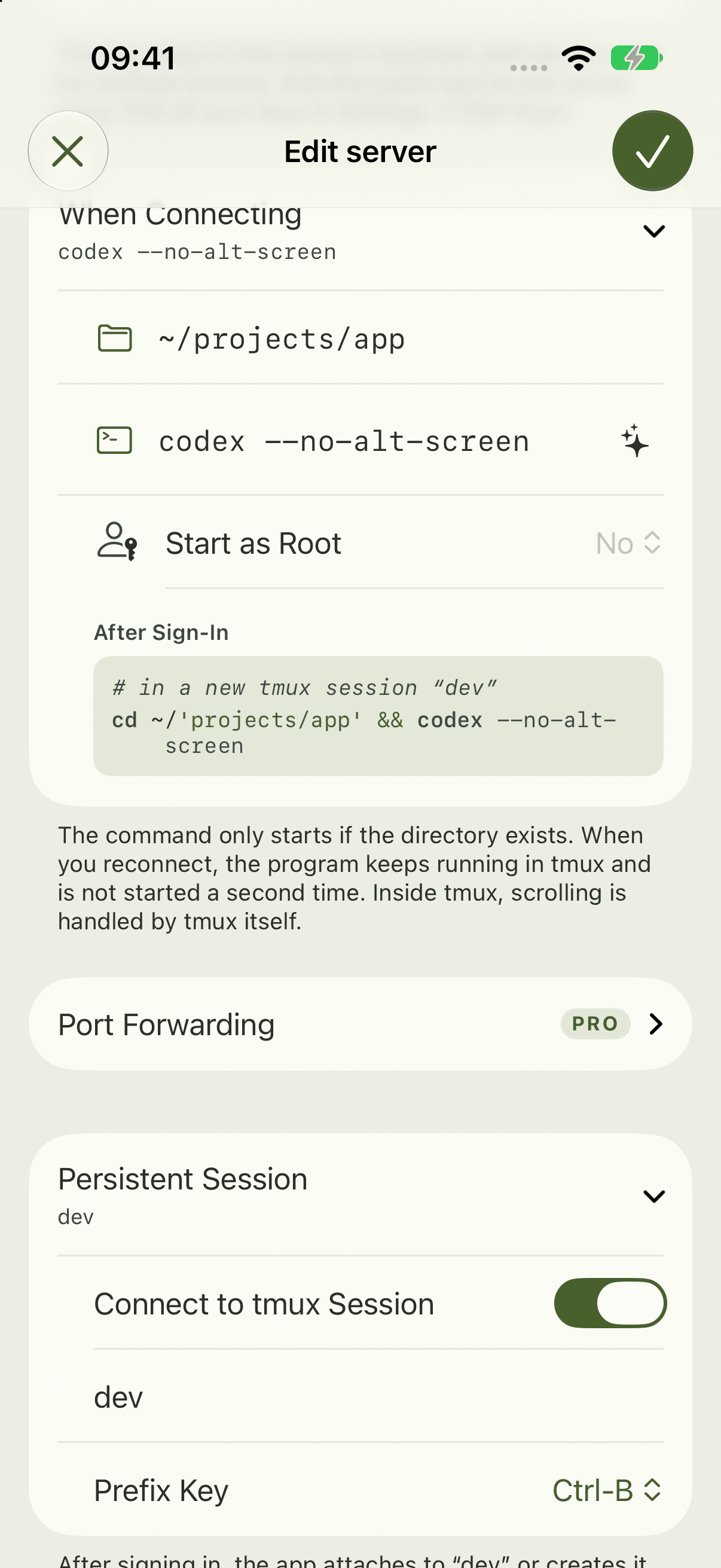
Turn on tmux in the host’s settings. That’s also where you set the start directory and start command.
Reconnect
After an interruption, connect again. With tmux enabled, Shell22 reattaches to the same session and your programs are still running.
tmux on the server
Independent of the app, these are the essential tmux commands. They work in any SSH terminal.
# Create a named session
tmux new -s app

# List existing sessions
tmux ls

# Attach to a session
tmux attach -t app
Press Ctrl+B, then D to detach from the session without ending it.
Made for long tasks
Coding agents such as Claude Code and Codex run on your server. In a tmux session, the agent keeps going even when your connection drops.
Good to know
Inside tmux, usually only the bell signal gets through for notifications. Background notifications need “Keep Connection in Background” and Pro.
The menus come from the app. tmux is a separate program and not part of Shell22.
Port 22.
In your pocket.
Your next server is one tap away.
Notify meFor iPhone and iPad · iOS 27 and later