SSH FOR IPHONE & IPAD

Your servers.
Within reach.

Your native terminal for work on the go. Connect to your servers, work with your coding agents and jump back into your session with one tap.

Coming to the App StoreNotify meExplore Shell22

Start for free · Pro is a one-time purchase
No cloud relay. No account.

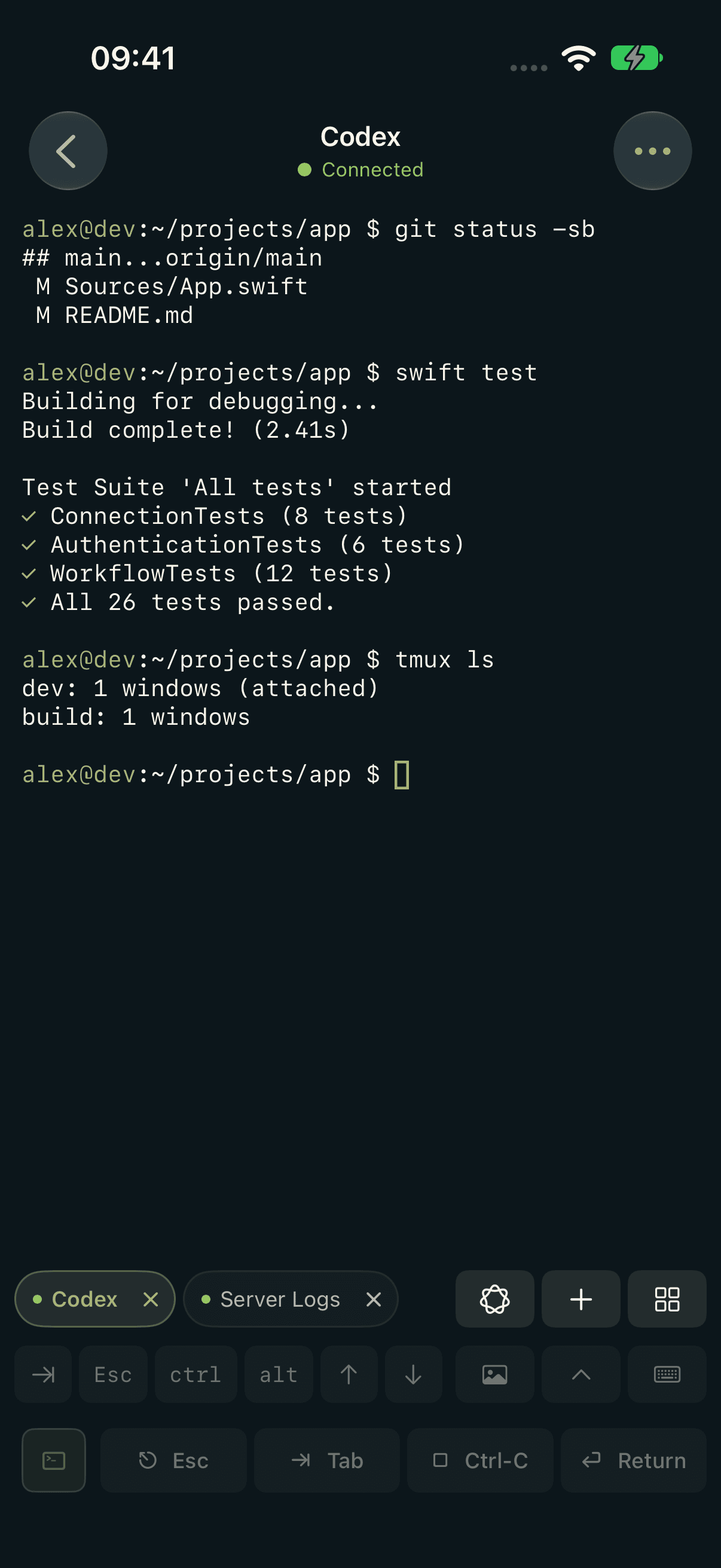
Shell22 on iPhone showing git status, passing tests, tmux sessions and the keyboard bar
REAL APP. REAL SSH.

YOUR TERMINAL, ON THE GO

One terminal.
Your whole workflow.

Scroll to explore

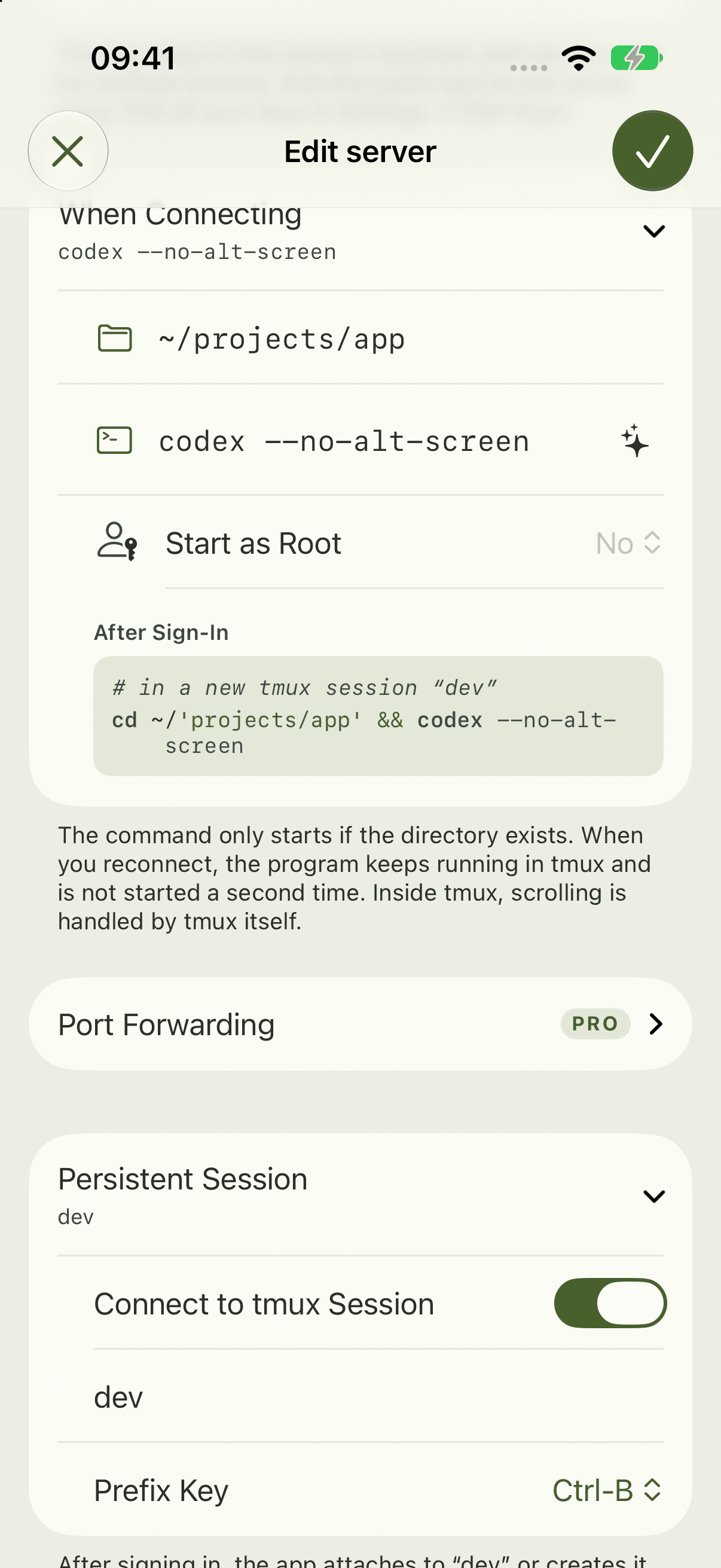
Shell22 host settings with expanded project startup and persistent tmux session

Connect

  1. 01Connect
  2. 02Commands
  3. 03Your colors
  4. 04Your network

01 / Connect

Your agent works.
You’re on the move.

Codex or Claude Code runs on your server. Shell22 takes you straight to your project over SSH, with a start command and tmux for each host.

More about coding agents

tmux must be installed on your server.

Shell22 host settings with expanded project startup and persistent tmux session
alex@dev — ~/projects/apptmux
tmux / appConnected

alex@dev:~/projects/app $ tmux attach -t app

[app] 0:codex* 1:shell

✓ git status --short✓ working tree clean❯

Your session is waiting.

Interactive demo · Sample data

02 / Commands

Type less.
Get more done.

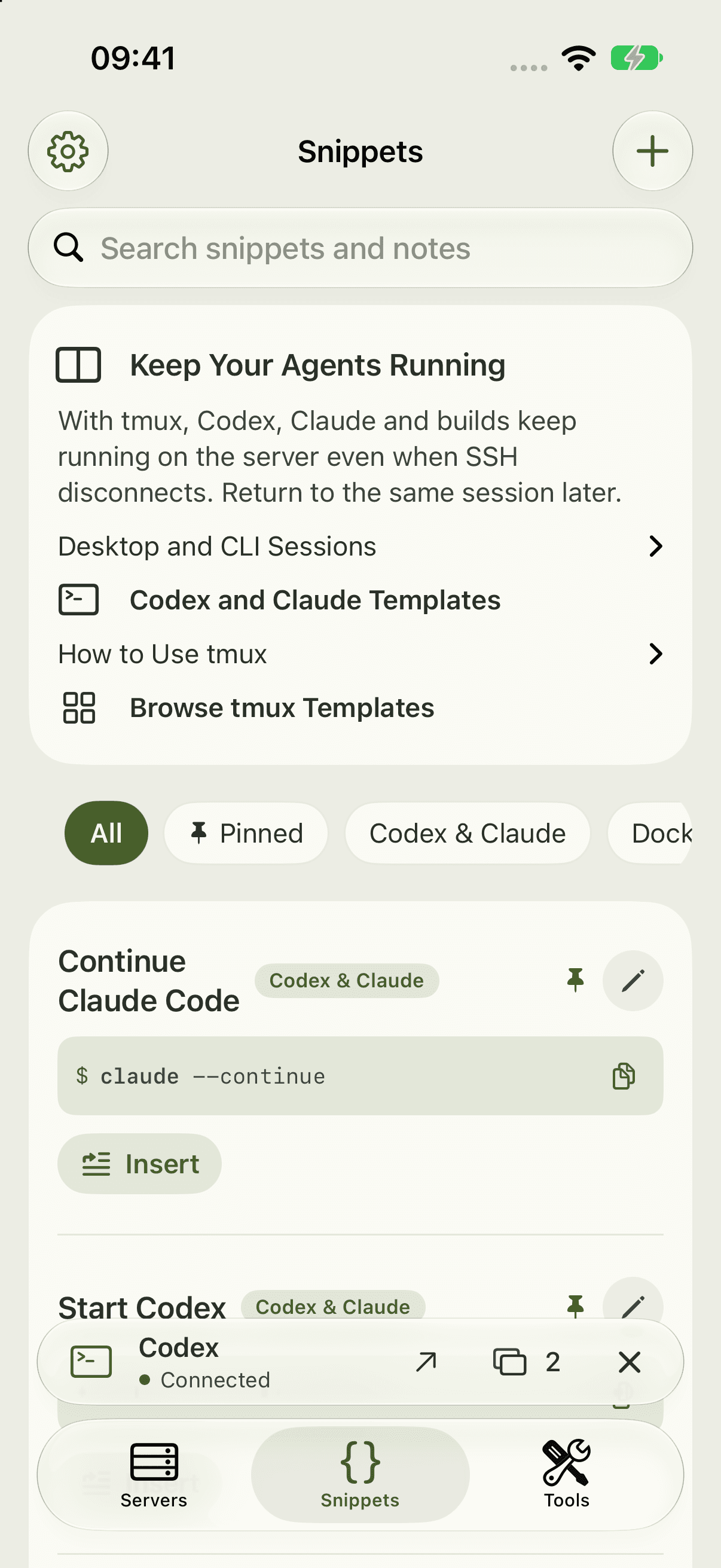
Editable templates for Codex, Claude, tmux, system tasks, Docker, Git and more. Save your own commands with notes, placeholders and favorites. The command editor also finds suggestions by name and notes.

↳ You decide what gets sent.

Shell22 snippets with categories, favorites and highlighted commands
~/projects/appsnippets

alex@dev $ git status

On branch main
Your branch is up to date.
✓ working tree clean

Input

git status --short

Command ready. Not sent yet.

Interactive demo · Sample data

Commands, briefly explained.

Apple Intelligence explains entered or selected commands: their purpose, key options and an illustrative example output when useful. Explanations stay on your device and run nothing.

Requires a supported device with Apple Intelligence enabled and available. Model responses can contain errors.

03 / Your colors

Your terminal.
Your colors.

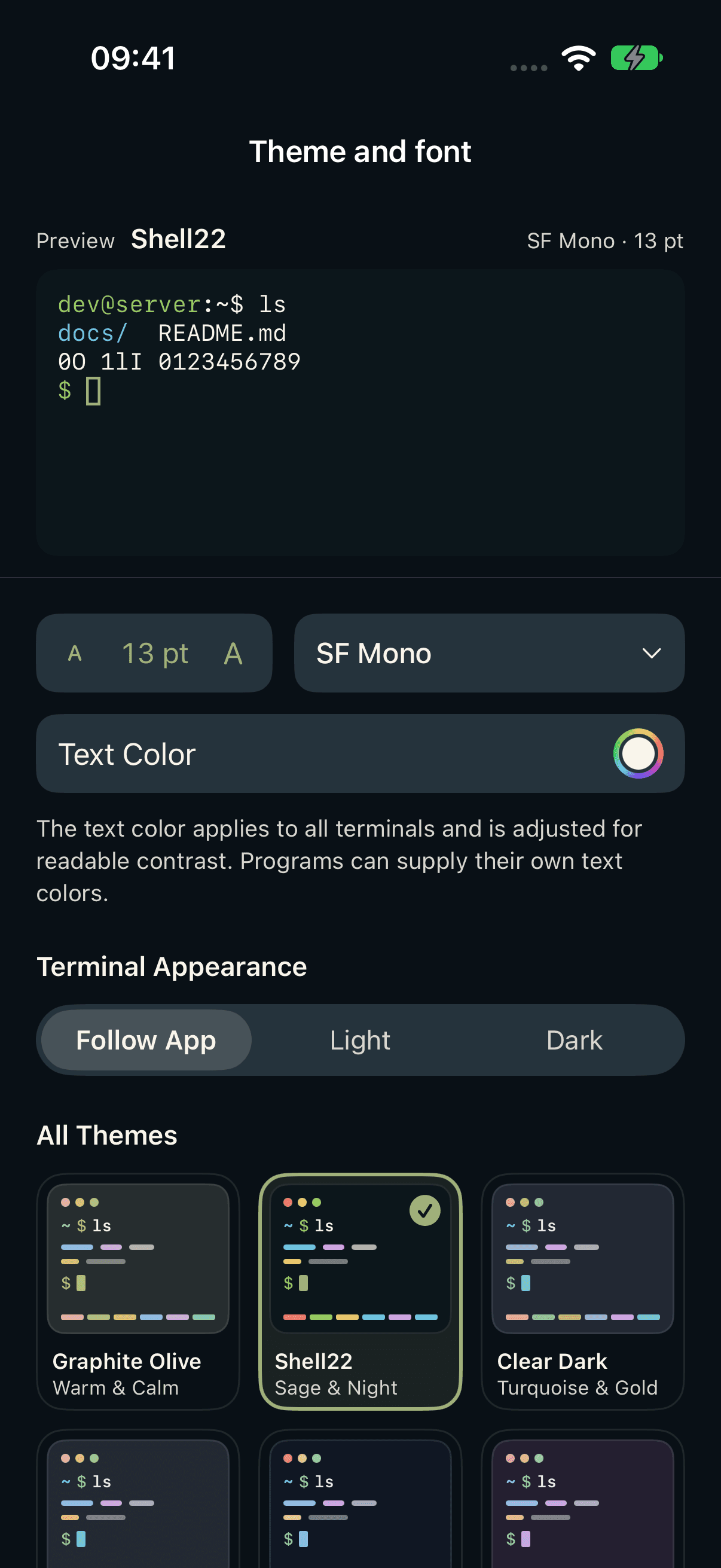
Eight themes for the app and individual hosts. Choose SF Mono, Menlo or Courier, adjust size and text color, and see changes in a real terminal preview. Every theme is free.

Current Shell22 gallery with terminal preview, font choices, text color and eight themes
Choose a terminal theme

Eight real app palettes. Try them out.

Interactive demo · Sample data

Shell2216 ANSI

alex@dev:~/app $ git status

main ↑3 ~1

alex@dev:~/app $ ls

src/  docs/  README.md
warning: local changes

Active theme: Shell22

04 / Your network

Know your network.

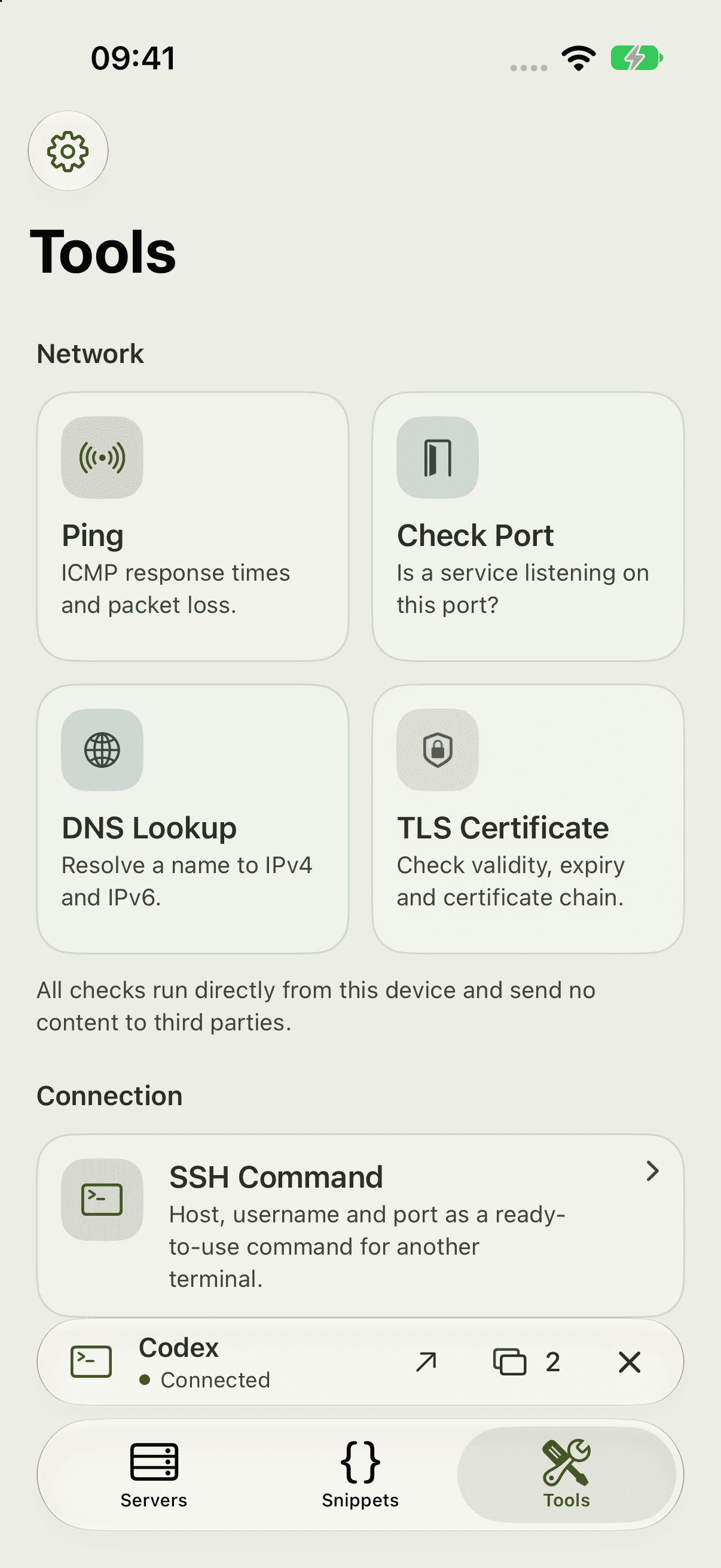
Check ping, TCP ports, DNS and TLS certificates straight from your device.

Shell22 network tools with ping, TCP port check, DNS lookup and TLS certificates
iPhone / iPad
Your server
pingTCPDNSTLS

No cloud relay. No account.

SHELL22 PRO

More tools.
For your projects.

Up to eight terminals. Two in split view. And the tools for everything in between.

Explore Pro
01 / PRO

Workflows

Up to 32 steps with a target server, directory and progress.

Preview your commands, start them and follow their progress. Each step begins only when the previous one succeeds.

Preview · dev / ~/projects/appPRO
01git pull --ff-onlyReady
02npm ciReady
03npm run buildReady

One workflow. Three steps.

Interactive demo · Sample data

This example builds a project. It does not deploy files.

02 / PRO

Split view

Two terminals side by side or one above the other.

03 / PRO

Port forwarding

Open web dashboards such as Portainer over your SSH connection.

-L 9443:localhost:9443
04 / PRO

Notifications

When a program or your agent is waiting for you.

Bell · OSC 9 · OSC 777
05 / PRO

Files & SFTP

Browse folders, preview files, upload and download.

06 / PRO

Shortcuts & Siri

Connect to your server or insert a snippet.

shell22://
07 / PRO

Eight terminals

Instead of two in the free version.

IPAD / WORKSPACE

More room on iPad.

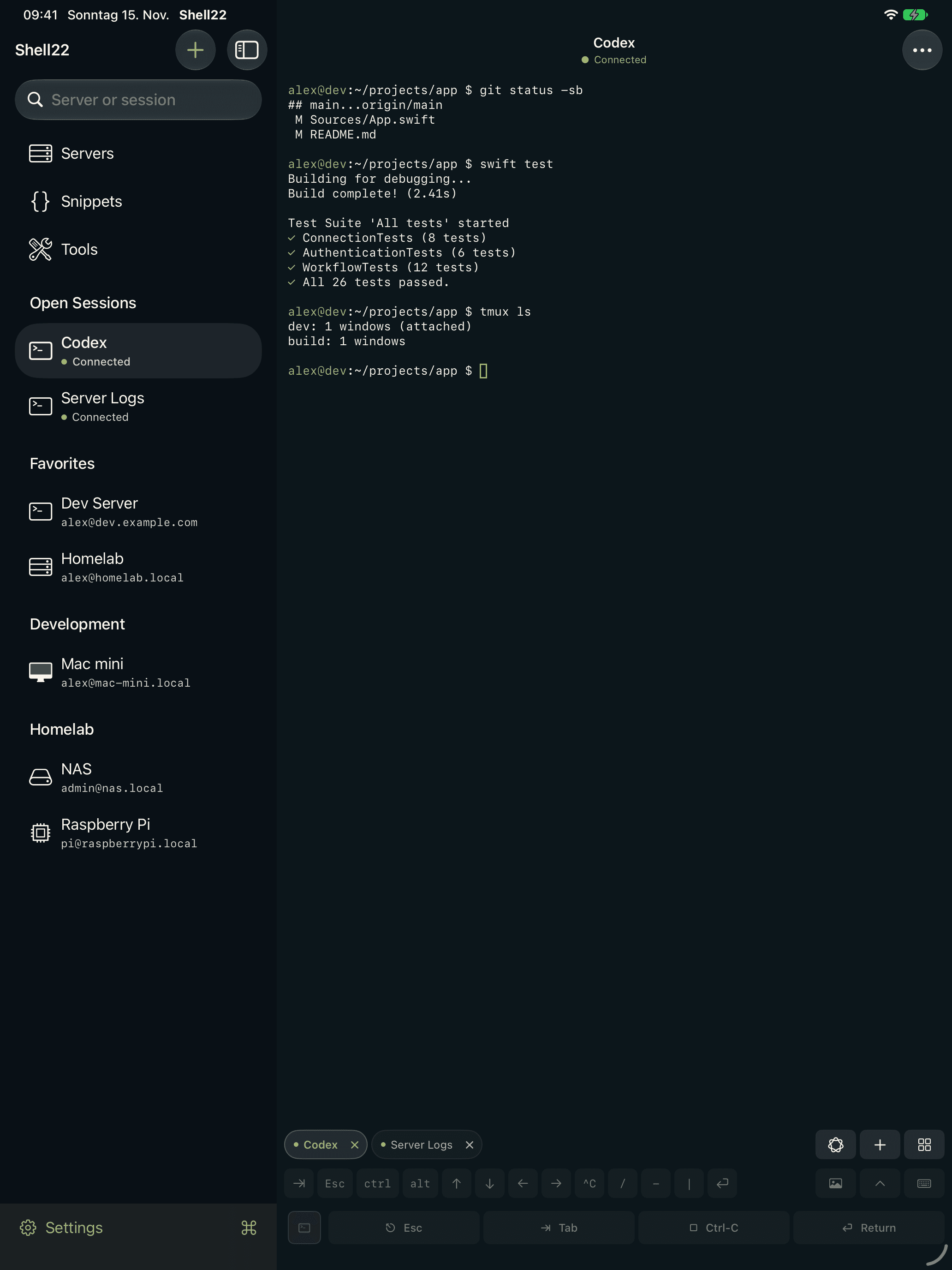
The sidebar keeps servers, favorites and open sessions within reach. Custom session names help you switch; Pro lets you view two terminals together.

Current Shell22 iPad workspace with sidebar, servers and open sessions

YOUR TERMINAL. YOUR CHOICE.

Start for free.
Unlock more. Once.

Free

Forever

0 €

Everything for your first sessions.

  • SSH & two terminals
  • SSH keys & Face ID
  • Snippets & keyboard bar
  • All eight themes
Coming to the App StoreNotify me

Price in Germany; other regions follow Apple’s pricing tiers.

DIRECT MEANS DIRECT.

Your keys.
Your device.

Passwords and private keys stay on your device. When iCloud is enabled, servers, snippets and workflows sync through your private CloudKit database. SSH connects you directly to your servers.

  • No account
  • No analytics
  • No ads
  • No tracking

How Shell22 protects your data

GOOD TO KNOW

One more question?

Get support
What does Shell22 cost?

Shell22 is free. Pro unlocks more features for a one-time payment of €14.99. No subscription. This is the price in Germany; other regions follow Apple’s pricing tiers.

Do I need an account?

No account or registration. Your SSH connection goes directly from your device to your server.

Does Shell22 work on iPad?

Yes. Shell22 supports iPhone and iPad running iOS or iPadOS 27.0 or later.

Does Shell22 work with Claude Code and Codex?

Yes. The agents run on your server. Shell22 is your SSH terminal, with per-host start commands, tmux and optional notifications with Pro.

Does my session survive a dropped connection?

With tmux enabled for the host, reconnecting reattaches to the same session. tmux must be installed on your server; the app does not install it.

Where are passwords and key data stored?

Passwords, private keys and trusted server identities stay in the device-bound Keychain. Public key data, servers and snippets sync when iCloud is enabled. Workflows also include the latest run and up to 128 KB of output.
Shell22

Port 22.
In your pocket.

Your next server is one tap away.

Coming to the App StoreNotify me

For iPhone and iPad · iOS 27 and later